How We Reached 91% Automated Routing Accuracy in Exposure Management

At HackerOne, being "Customer Zero" means we test our own platform's capabilities before they reach our customers. We don't just build features; we rely on them to secure our own infrastructure. Recently, we tackled one of the most repetitive and time-consuming parts of the exposure management lifecycle: report routing, or in other words, who is the right person/team to work on this finding?
We built an intelligent automation using Hai (our AI security agent) that analyzes incoming reports, predicts the correct product team, and automatically escalates them to GitLab, but only when it's sure. Consistency is key in handling security reports; it’s better for security researchers, our engineering teams, and our security posture
Here is how we turned a manual, inconsistent process into a high-speed, accurate, automated workflow. The more we automate, the more time we free up to make our systems more secure.
Behind the Build: The Routing Bottleneck
Every security team knows the pain of the "triage queue." Before a vulnerability can be fixed, it must reach the right person. For us, that meant a Security Duty Engineer reading every report, determining which of our 47+ product areas it belonged to, and looking up the correct GitLab labels to route it to the corresponding team.
This process has major limitations:
- It was slow: Reports sat in the pending program review (PPR) queue until a human looked at them. An unpatched security vulnerability is open longer. Hackers have to wait.
- It was inconsistent: Different engineers might route similar bugs to different teams. Engineers reroute security issues due to incorrect ownership assignments, which increases our Time-To-Resolution (TTR).
- It was manual: Valuable engineering time was spent on administrative tasks rather than vulnerability analysis.
We asked ourselves: "Can Hai understand our internal organizational structure well enough to do this for us?"
The Solution: Confidence-Based Automation
We didn't want an AI that made wild guesses. We needed precision. So, we built a system based on confidence thresholds.
The automation runs on every new report that hasn't been escalated yet. It follows a strict logic flow:
- Analyze: Hai reads the report title and description.
- Predict: It matches the content against our internal "Routing Map" (a dataset of features and owning teams).
- Score: It assigns a confidence score (0-100%) to its prediction.
- Act:
- If Confidence ≥ 90%: It updates custom fields, syncs labels, and escalates to GitLab automatically.
- If Confidence < 90%: It logs the prediction for review but leaves the routing to a human.
To make sure the threshold was correct, we validated the model against a manually reviewed set of reports. This provided us with a clear picture of how well Hai performs at different confidence levels, which helped us choose the 90% boundary.
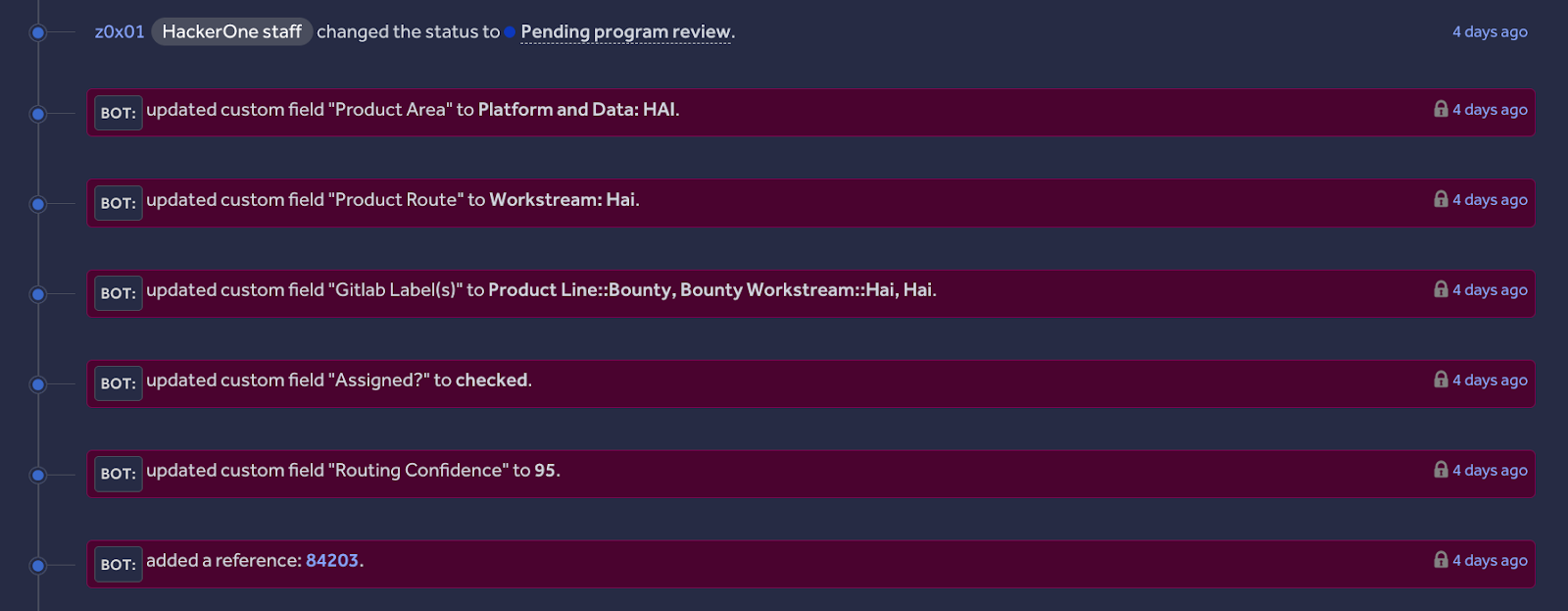
How It Works (The Intelligence & The Flow)
At the heart of this automation is a Hai Play. Think of this as the "brain" of the operation. We didn't just ask Hai to "guess the team." We provided it with structured domain knowledge:
- Routing Scope: Rules to determine if a report is for Engineering or Internal IT.
- Routing Map: A mapping of 47+ product areas to specific teams.
- GitLab Labels: The exact label arrays required for our issue tracker.
When a report arrives, the automation prompts Hai:
"Route report #123456 based on the provided routing map. Return the product area, routing team, and confidence score."
Hai analyzes the report and returns a structured JSON response:
{
"area": "Hai",
"routing_team": "Team: Hai",
"confidence": 95,
"gitlab_labels": ["Product Line::AI", "Team::Hai", "Hai"]
}
If the confidence is high enough, the automation triggers the GitLab Escalation step. It verifies that the labels are set correctly (a critical safety check) and then uses the HackerOne API to create the issue in GitLab, establishing a bi-directional link between the report and the fix ticket.
The Human Safety Lane: PPR Lane Tracker
Automation is great, but visibility is paramount. If we only track the routed reports, we risk missing the ones that slip through the cracks.
To solve this, we built a secondary automation called the PPR Lane Tracker. This runs on every report, regardless of whether Hai routed it or not. It sends a notification to a dedicated Slack channel with the report's status:
- Routing Status: Which team picked it up (or if it's unrouted).
- Assignment Status: Has it been assigned to a team yet? And has anyone claimed it?
- Link: Direct link to the GitLab issue and the report in H1 Platform.
This ensures that even if the AI isn't confident enough to route a report, our team still gets a "heads up" in Slack.
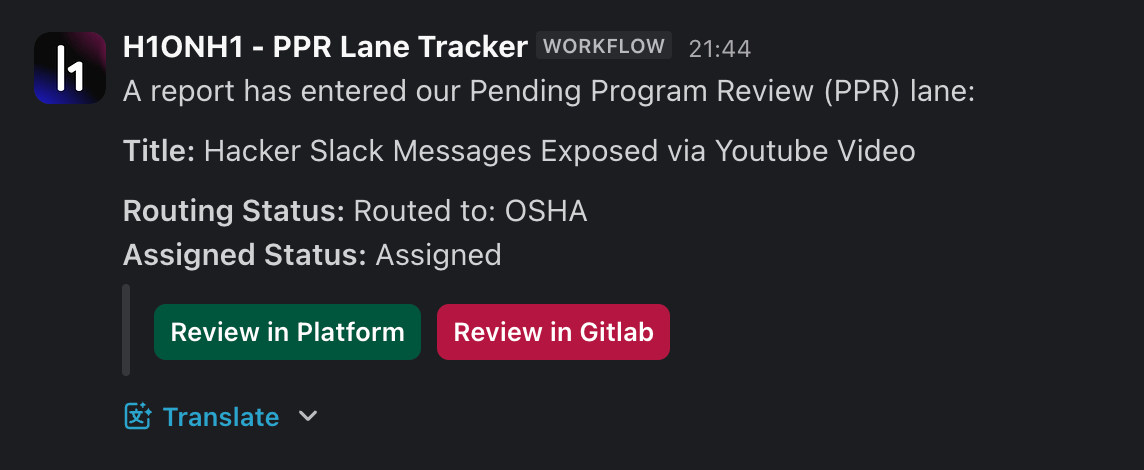
See It in Action
Here is what happened when a recent report titled "Prompt Injection in Hai Intake Agent" landed in our pending-program-review state:
- Submission: The report arrived at the pending-program-review (PPR) state at 14:00.
- Analysis: Hai recognized the asset and the context immediately.
- Prediction: It identified the "Workstream: Hai" team with 95% confidence.
- Action: Within seconds, the automation updated the "Product Area" custom field and created a GitLab issue with the labels
Product Line::AIandTeam::HaiandHai. - Notification: Our security team received a Slack alert confirming the routing was complete.
Total time from submission to the correct engineering backlog: Under 1 minute.

Why This Matters
We analyzed the performance over 100+ reports, and the results changed how we view triage:
- High Accuracy: At a 90% confidence cutoff, Hai is 91% accurate.
- Reduced Toil: We automatically cover approximately 64% of all incoming reports. That's nearly two-thirds of the queue that our engineers no longer have to manually route.
- Faster Remediation: By removing the administrative lag, reports get to the people who can fix them faster.
This automation proves that AI isn't just for finding bugs; it's for fixing the workflows that slow us down. By combining Hai's reasoning capabilities with strict logic gates (such as the 90% threshold), we've built a system that we can trust.
Start Building Your Own Routing Brain
Ready to turn manual triage into an automated advantage? You can start by mapping your organization's structure into a Hai Play just like we did. HackerOne users can find effective Hai Use Cases for templates and inspiration. Build your brain, set your thresholds, and let the automation handle the rest.
About the Author