

Deriv's Playbook
Why this playbook exists
Security teams need to move faster without sacrificing accuracy. As report volume grows, especially during bounty campaigns, manual triage creates delays, inconsistency, and analyst fatigue. This playbook breaks down how Deriv streamlined their HackerOne triage workflow using Hai with humans in the loop.

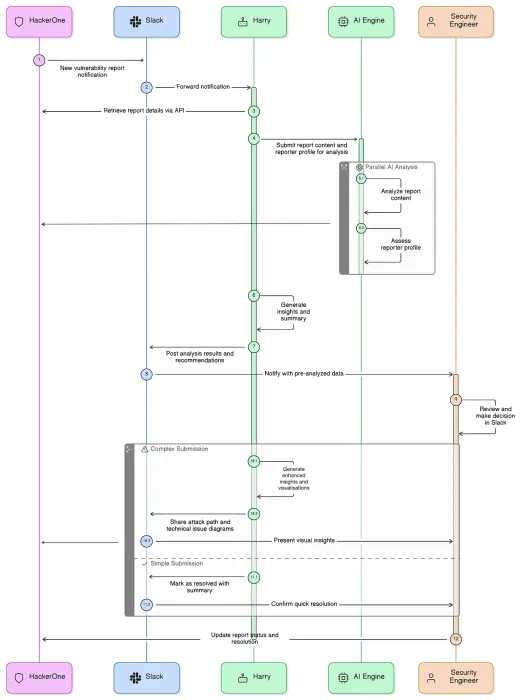
Getting Started
What You’ll Learn
- How to design a lightweight AI-assisted triage workflow around your existing tools
- How to integrate HackerOne reports directly into your team’s communication hub
- To maintain strong human-in-the-loop controls while scaling triage efficiency
What You’ll Need
- A central hub (Slack, Teams, or similar) for notifications and collaboration
- A system of record for remediation (HackerOne workflows, Jira, ServiceNow, or similar)
- Access to HackerOne webhooks or APIs
- Access to Hai APIs
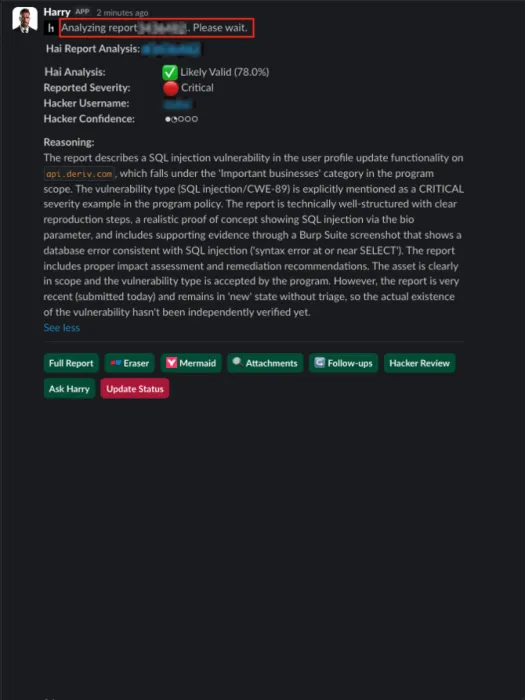
Overview
Defining the Challenge
Deriv was facing triage bottlenecks:
- Slow responses when reports arrive after business hours
- Manual, repetitive triage steps
- Knowledge silos that make onboarding junior engineers difficult
- Report overload during high-volume campaigns
Solution
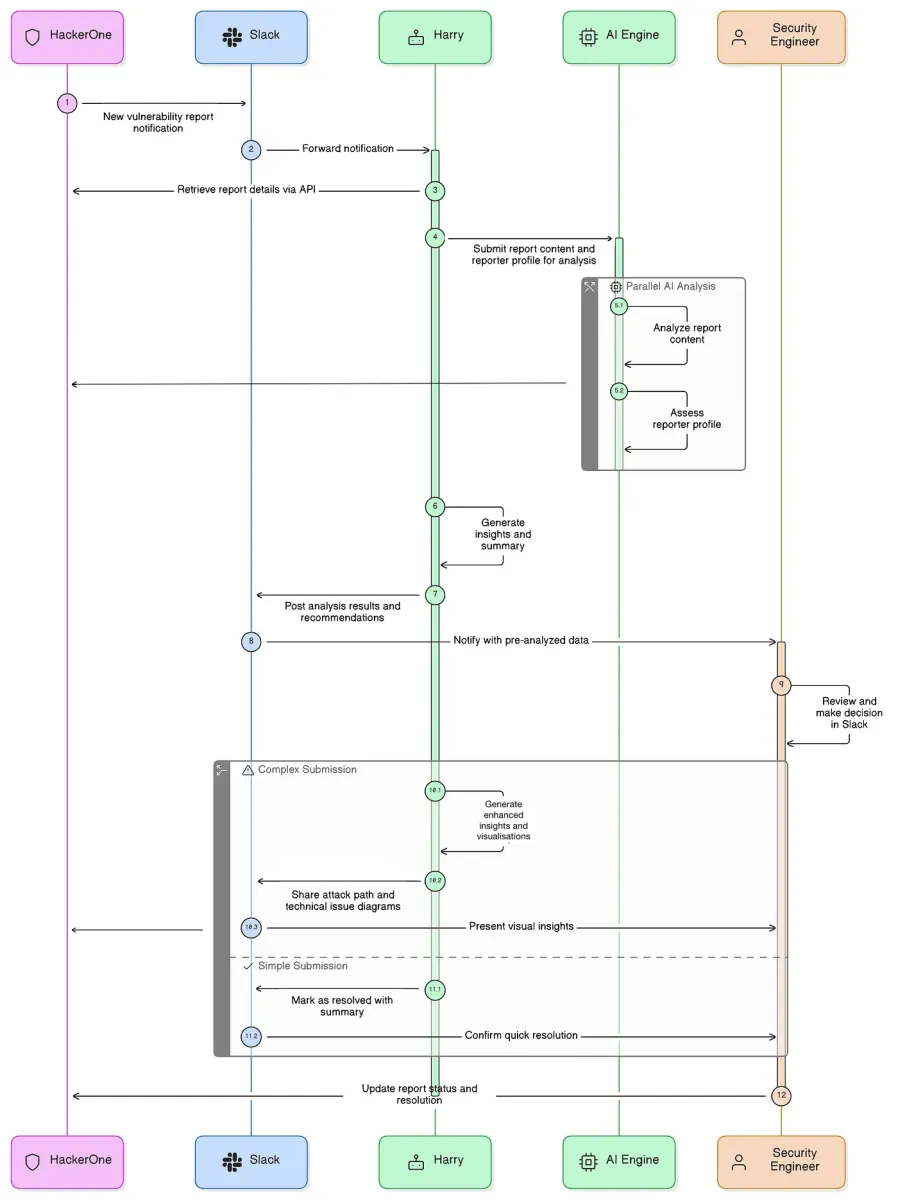
- Build a custom Slack integration that integrates HackerOne reports with Hai to deliver real-time, AI-assisted analysis directly to engineers. (Deriv named their Slackbot Harry).
Expected Results
- Faster initial response times, even during outside business hours
- More consistent triage regardless of quality or analyst experience
- Reduced context switching
- Clearer understanding of complex attack paths earlier in the process
How to Build Your Own Streamlined Triage Workflow
Establish HackerOne as your system of record and choose your team’s central hub for notification.
Use HackerOne as the authoritative source for vulnerability intake, validation, prioritization, and remediation tracking. This ensures every finding is validated, deduplicated, and owned end to end.
Deriv uses Slack as a notification and collaboration layer, surfacing HackerOne events directly to engineering teams when action is required. (Microsoft Teams or other messaging tools work equally well if they support webhooks.)
Identify the pain points you want to solve and the repetitive actions engineers take.
Deriv’s targeted pain points were:
- Slow response outside business hours
- Manual triage steps
- Need to centralize knowledge
- High variability in report quality
- Overload during bounty campaigns
- Common responses needed for consistent report handling
Map Hai capabilities to those needs.
- Report summarization
- Severity estimation
- Asset associated
- Attachment analysis
- Diagram generation
- Translation
- Follow-up Q&A
- Remediation suggestions
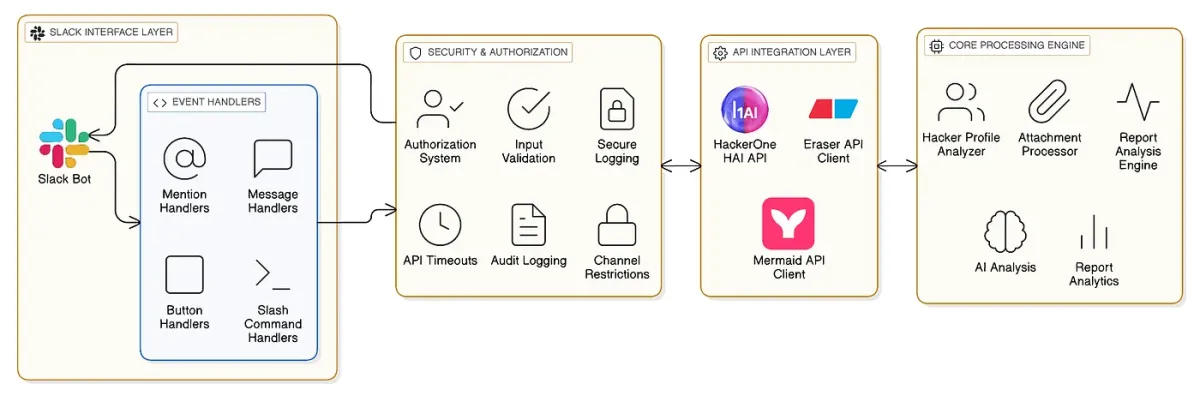
This integration is designed to surface new reports and AI-assisted context to engineers in real-time, not to replace HackerOne or your ticketing system as the system of record.
Use HackerOne webhooks or API polling to:
- Detect new reports
- Pull metadata and full report content
- Send reports to a dedicated triage channel
Deriv used this as the trigger for all subsequent AI steps.
Build an API connection that:
- Send the report content to Hai
- Receive structured output
- Format the response cleanly in Slack with interactive buttons
Dave Usher’s source code (available in Github) provides a skeleton for this integration.
Use buttons to speed up analysis while preserving control. Deriv implemented actions such as:
- “Show me the full report” -> Convenience function to avoid context switching.
- “Give me a quick analysis” -> Hai summarizes vulnerability type, exploitability, impact, and next steps.
- Analyze attachments” -> Hai’s OCR, translation, and parsing for screenshots, logs, code snippets.
- “Visualize the attack path” -> Sequence diagrams or request flows using Eraser or Mermaid renders.
- “Ask Harry” (Q&A) -> Helps junior engineers or clarifies ambiguous reproduction steps.
- “Update status” (human-controlled) -> Purposefully requires manual confirmation which prevents accidental changes and ensures all state updates have human oversight.
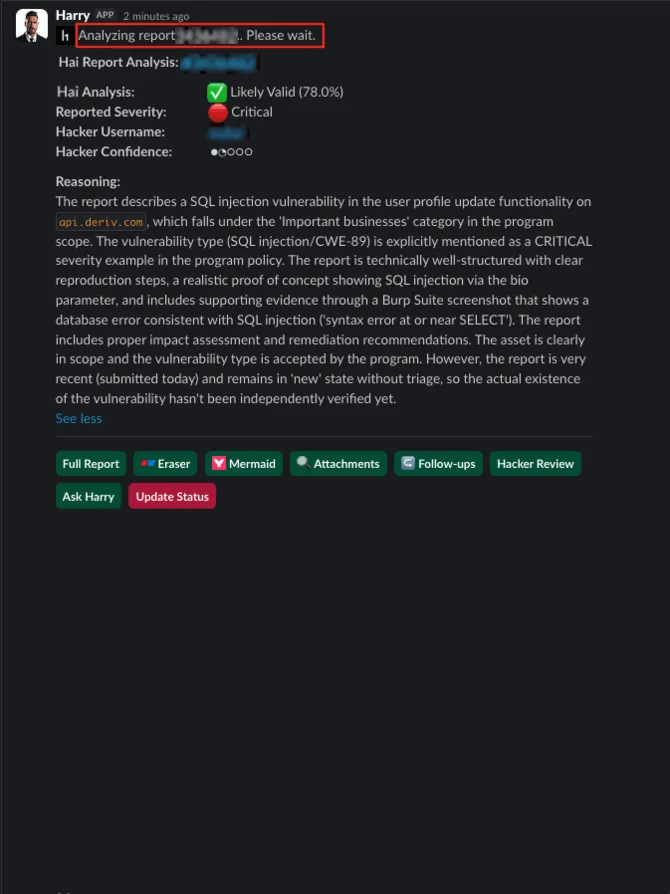
Remember: AI supports analysis, but humans make decisions.
Best practices:
- Require manual approval for severity changes and state updates.
- Use visual cues for decision buttons (Deriv used red for high-impact actions).
- Log which actions were AI-generated vs human-approved.
- Prevent auto-closing or auto-escalation.
Prompt tuning is ongoing, not one-and-done. Expect to iterate.
- Keep outputs concise and high-signal
- Avoid long, essay-style responses
- Refine prompts based on real report variance
- Optimize for analyst speed, not completeness
Once the core workflow is stable, add functionality such as:
- Auto-tagging severity or vulnerability classes.
- Campaign-mode settings during report volume spikes.
- Routing logic by asset or team (e.g., mobile team vs. backend team).
- Integrations with Jira or ServiceNow to cut and track remediation tickets once human triage decisions are made.